
Home/Solutions/Document control
- ISO 9001 clause 7.5
- Approval workflows
- Audit trail
- Access policies
Document control
Document control software for ISO-certified businesses
Tech Integra Document Control keeps every procedure, form, policy, manual and work instruction in one master register, with controlled revisions, approval workflows, scheduled releases, periodic reviews, role-based access and an append-only audit history. Everyone works from the approved version, and the auditor can see how it got there.
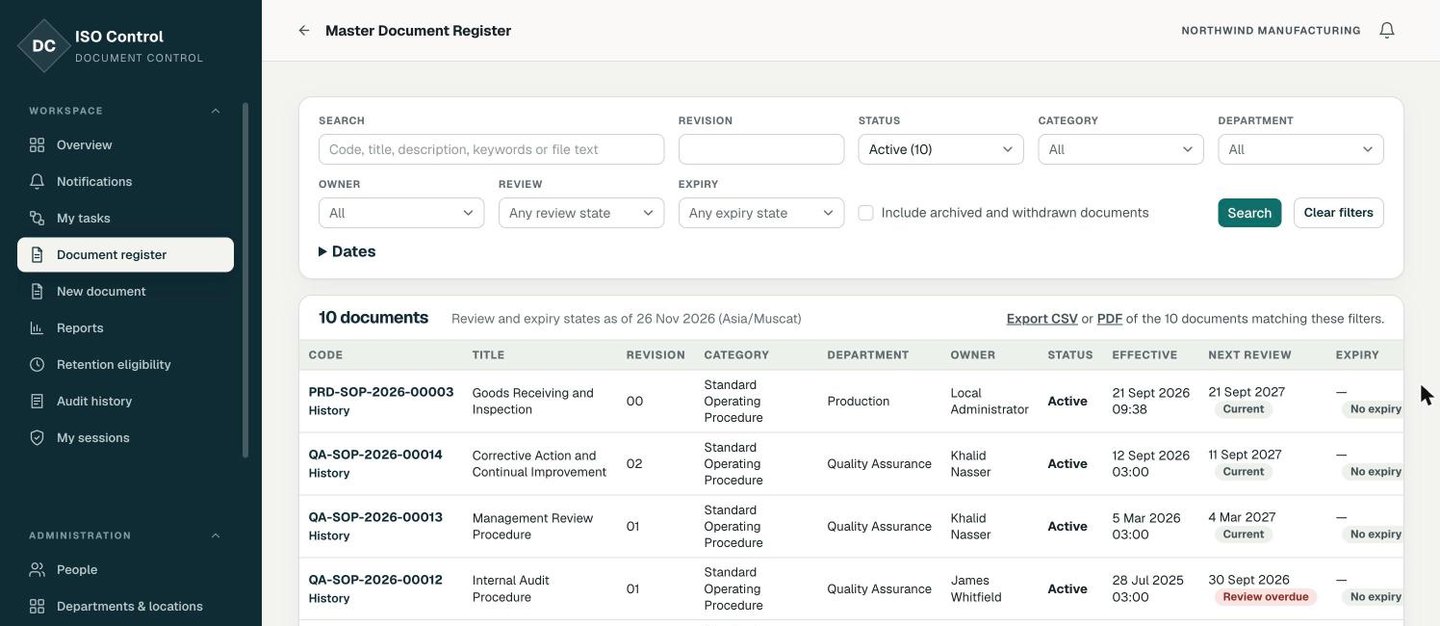
Real screen, sample data
Why it matters
Shared drives are not document control
Auditors ask three questions: is this the current version, who approved it, and who could change it. A folder of Word files cannot answer any of them reliably.
One current version
Every document has one active revision. Superseded and withdrawn revisions stay in the history, out of everyday use.
Approval you can prove
Review and approval steps run as a workflow with due dates and reminders, and every decision is recorded.
Reviews that do not slip
Periodic review and expiry dates are tracked per document, with overdue reviews on the dashboard every morning.
The right people only
Access policies decide who can read, edit, approve, release or withdraw, by role, person, department and location.
Product tour
See document control, screen by screen
Pick a screen to see it and what it does, from the morning overview to the audit trail.
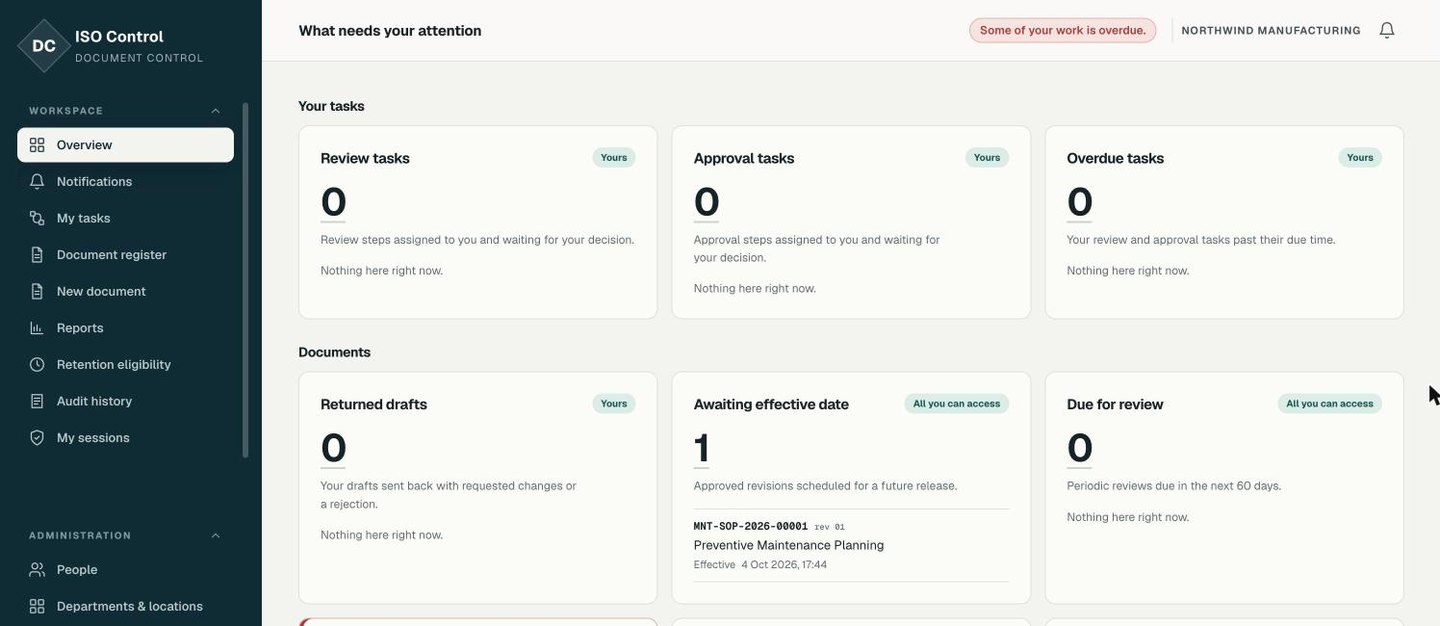
- Your tasks: review, approval and overdue tasks assigned to you
- Documents: returned drafts, approved revisions awaiting their effective date, reviews due
- Overdue periodic reviews: flagged the moment a review date passes
- Approaching expiry: and revisions released in the last 30 days
- Controlled codes: numbered by category and department, e.g. QA-SOP-2026-00014
- Revision and status: current revision, active, draft or withdrawn
- Review and expiry: next review date with Current or Review overdue flags
- Search and export: by code, title, keyword or text inside the file; export CSV or PDF
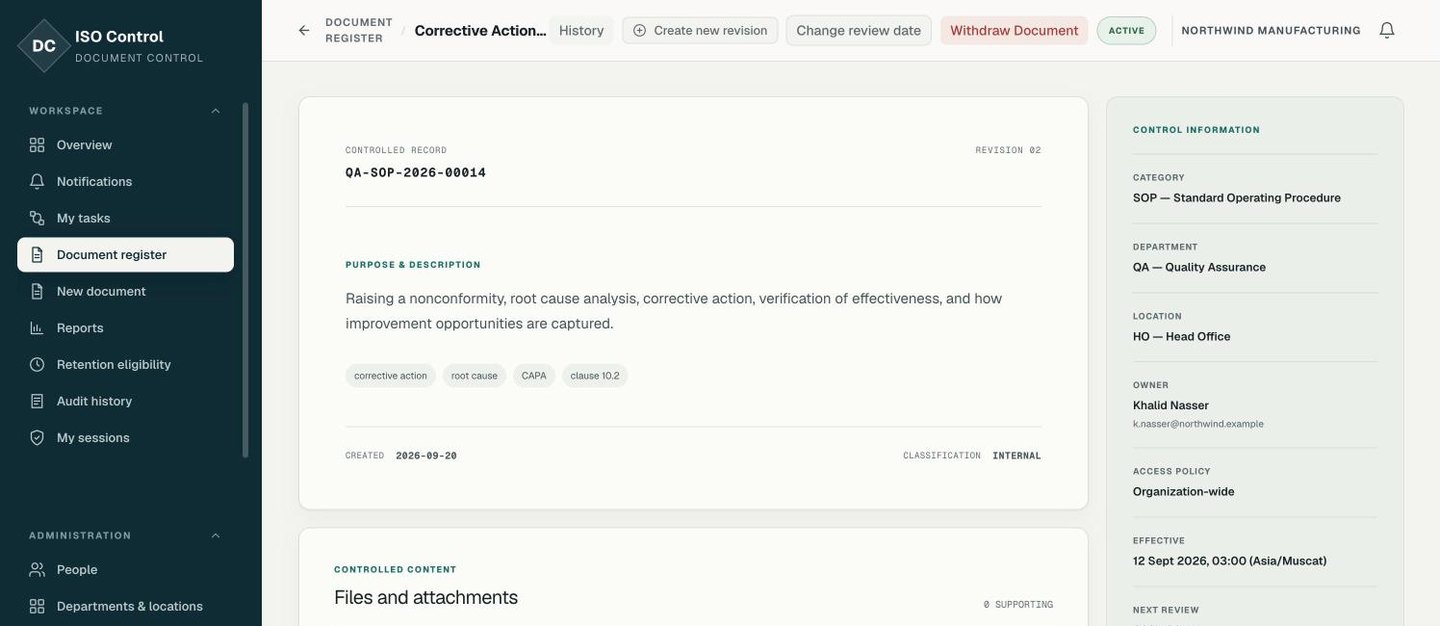
- Purpose and keywords: e.g. corrective action, root cause, ISO clause 10.2
- Control information: category, department, location, owner and access policy
- Dates: effective date, next review and expiry, in your organisation's timezone
- Actions: history, create new revision, change review date, withdraw
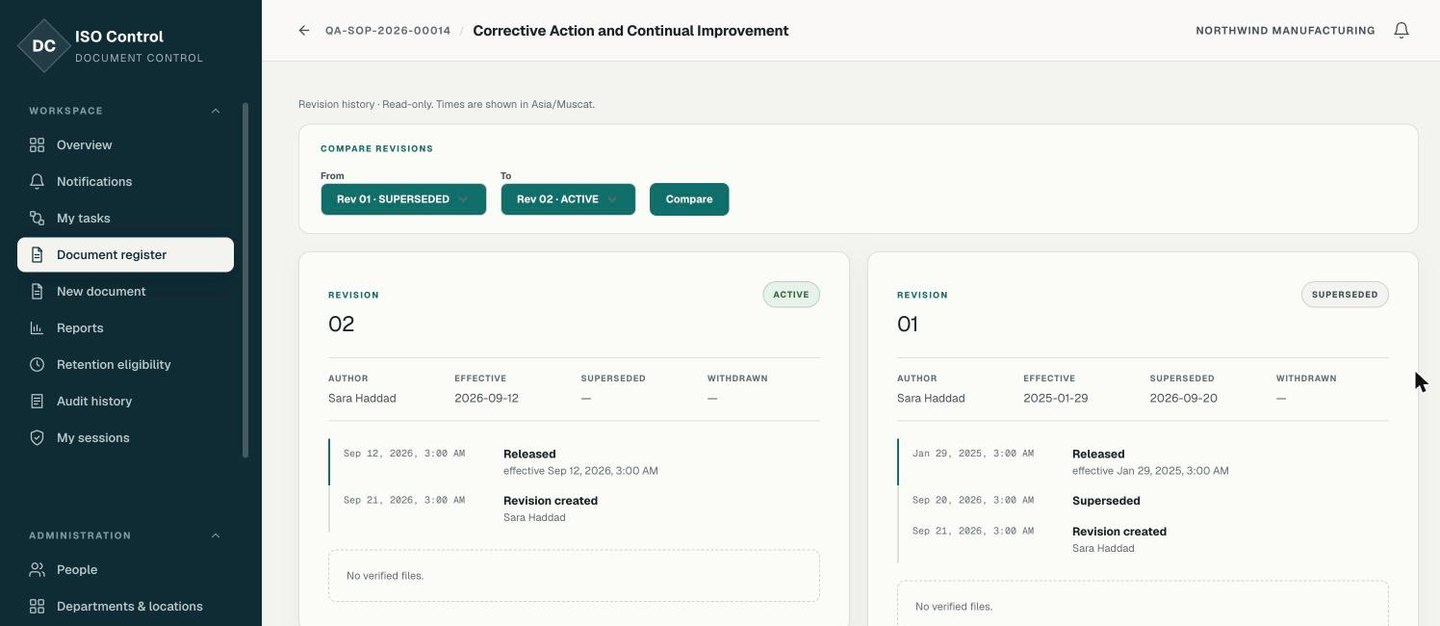
- Active and superseded: each revision with author, effective and superseded dates
- Compare revisions: pick any two and compare them
- Event trail: created, released and superseded, with timestamps
- Read-only: history cannot be edited after the fact
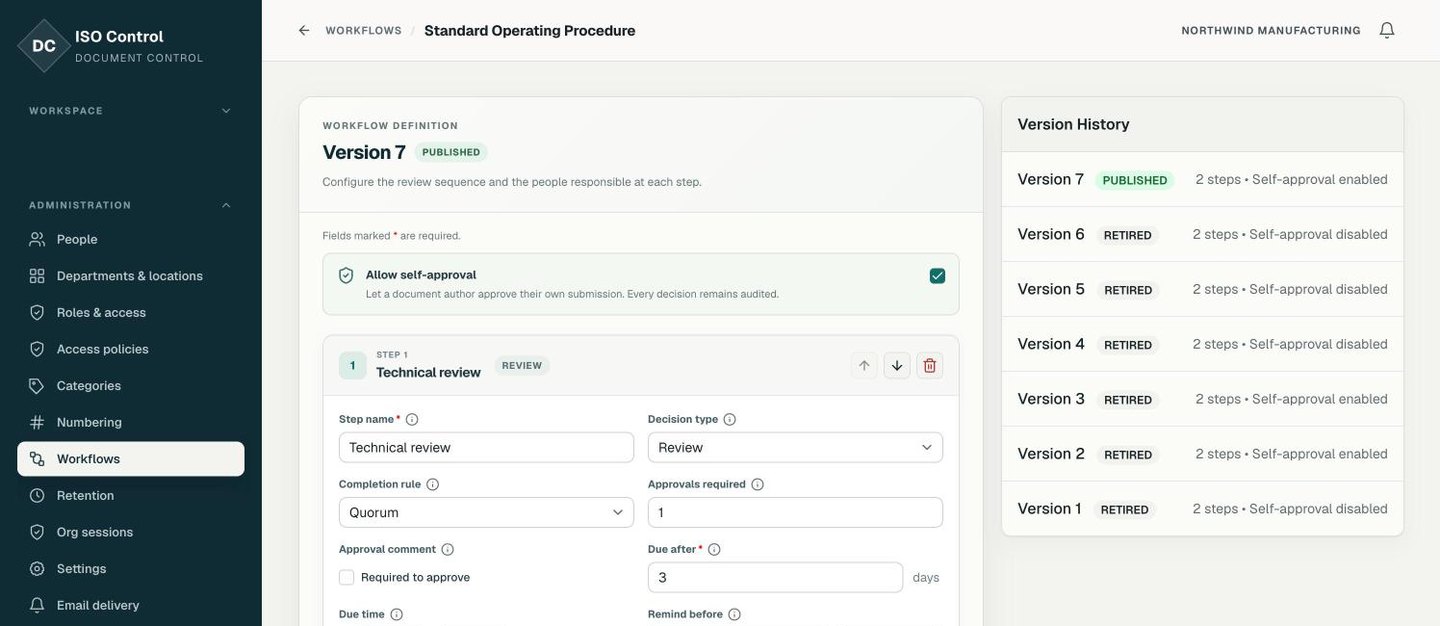
- Steps per category: e.g. technical review then approval for SOPs
- Completion rules: quorum and number of approvals required, comments required or optional
- Due dates and reminders: due after N days, reminders before and overdue reminders
- Versioned: every change creates a new workflow version; self-approval on or off
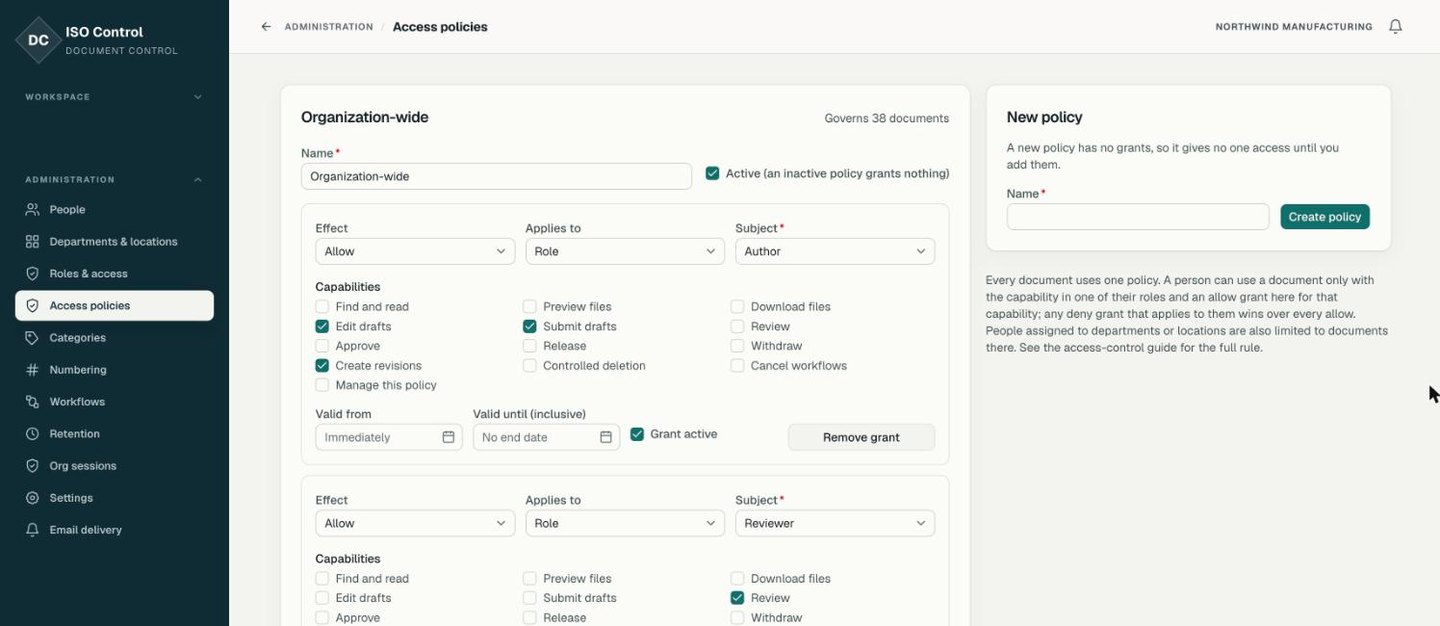
- Allow and deny grants: by role or person; any deny wins over every allow
- 12 capabilities: read, preview, download, edit drafts, submit, review, approve, release, withdraw, revise, controlled deletion, cancel workflows
- Validity dates: grants that start and end on set dates
- Department and location limits: people only see documents for their area
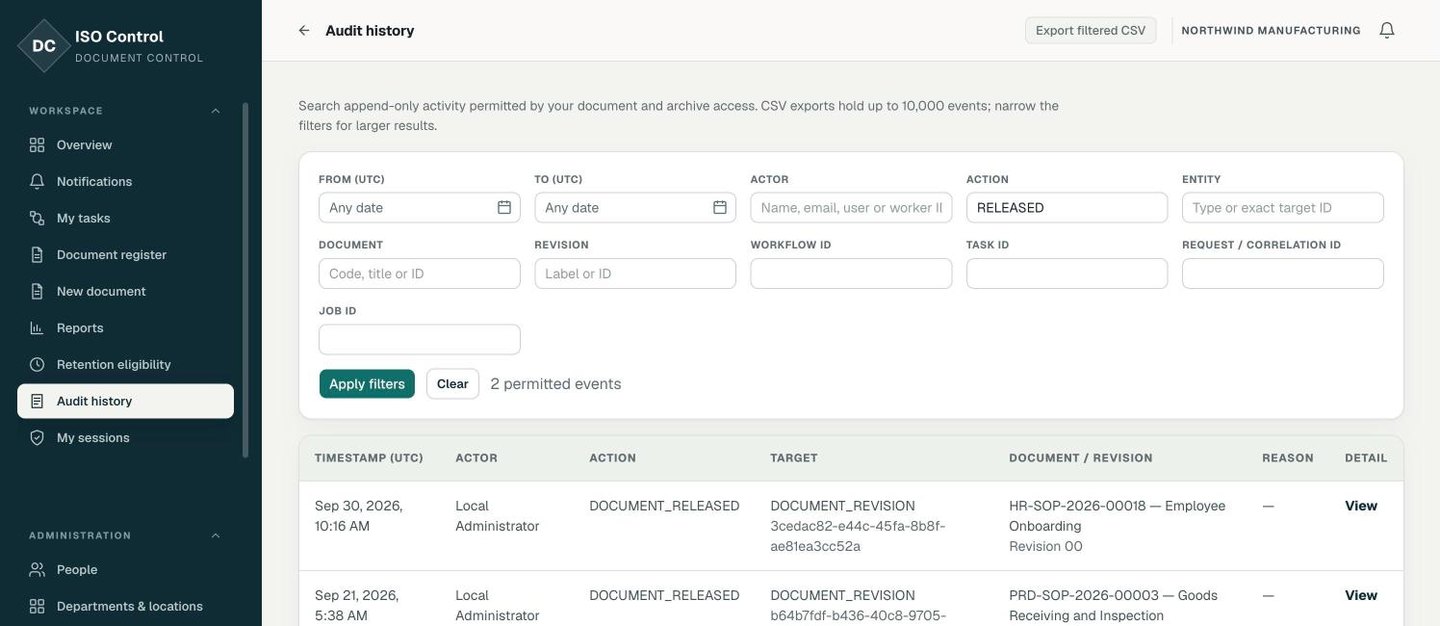
- Every action recorded: who, what, when and on which document and revision
- Filters: by date, actor, action, document, revision, workflow or task
- CSV export: up to 10,000 events per export
- Permission-aware: people only see activity for documents they can access
Real screens from Tech Integra. Names and client details are hidden or replaced with sample data.
All modules
Everything in document control
The full menu and the permissions an access policy can grant.
Workspace
- Overview
- Notifications
- My tasks
- Document register
- New document
- Reports
- Retention eligibility
- Audit history
- My sessions
Administration
- People
- Departments & locations
- Roles & access
- Access policies
- Categories
- Numbering
- Workflows
- Retention
- Org sessions
- Settings
- Email delivery
Document capabilities
- Find and read
- Preview files
- Download files
- Edit drafts
- Submit drafts
- Review
- Approve
- Release
- Withdraw
- Create revisions
- Controlled deletion
- Cancel workflows
Reporting
The reports a document controller runs
| Report | What it answers |
|---|---|
| Active document register | Every document in force, with its review and expiry position. |
| Expired documents | Active documents whose expiry date has passed. |
| Pending periodic review | Documents whose next review falls in the window. |
| Overdue periodic review | Documents whose review date has already passed. |
| Obsolete and archived revisions | Revisions retired by a newer release or by withdrawal. |
| Retention eligibility | Records that have reached the end of their retention period. |
| Audit history export | Every recorded action, filtered and exported to CSV. |
Questions
Frequently asked questions
What is document control software?
Document control software keeps every controlled document, such as procedures, forms, policies, manuals and work instructions, in one register with a unique code, a current revision, an owner, approval steps and review dates, so people always work from the approved version and an auditor can see how each one was approved and changed.
Does it support ISO 9001 clause 7.5 (documented information)?
Yes. Documents are identified by code and revision, reviewed and approved through configured workflows before release, available only to the people who should see them, protected from unintended change, and retained with their full revision and audit history, which is what clause 7.5 asks for.
Can we compare two revisions of a document?
Yes. The revision history shows every revision with its author and effective and superseded dates, and you can pick any two revisions and compare them.
Can a revision be approved now and take effect later?
Yes. An approved revision can be scheduled for a future effective date. It appears under Awaiting effective date on the dashboard and becomes the active revision at that time, in your organisation's timezone.
How are periodic reviews handled?
Each document has a next review date. Reviews due in the next 60 days and overdue reviews are shown on the dashboard and in reports, and the register flags each document as Current or Review overdue.
Who can see and change a document?
Access is set by policies. Each grant allows or denies specific capabilities to a role or person, optionally for a date range, and a deny always wins. People assigned to departments or locations only see documents for their area.
Is there an audit trail?
Yes. Every action is recorded in an append-only audit history with the actor, action, target document and revision, and it can be filtered and exported to CSV for auditors.
Related: ISO integrated management system · HR & payroll · Tech Integra ERP platform
See your own procedures under control
A walkthrough with your categories, numbering and approval steps rather than a generic demo.